UI/UX, Usability Testing, Cross-Platform Design, Content
Purdue IT
Enhancing the Self-Service Recording Studio Service (Video Express) experience for Purdue IT and implementing three new features focused on video backgrounds.

My Role
UI/UX Designer, Researcher
Duration
Aug. 2025 - Dec. 2025
Documentation
Presentation
Overview
/Challenge
One of Purdue IT's key services for Purdue University is Video Express, which offers on-campus studios where users can easily record high-quality videos for academic or professional use. Users (content creators) interact with a website and an in-studio tablet. Current features include scheduling, file manager (website) and backgrounds (in-studio tablet).
What's the issue? Existing users cannot:
Access backgrounds before entering the studio.
Upload their own backgrounds.
Understand how to create new backgrounds their videos.
Choose from a variety of options.
/Solution
To improve background selection and creation, we introduced three key features:
Personal Library to Upload Backgrounds
AI Background Generation (to help users with creating images)
Community to Share and View Backgrounds
All these features are accessible on the website for a smooth transition from out-studio and in-studio processes. The in-studio tablet includes those same three features, but with a much more constricted use so we don't overwhelm users and provide the development team with a feasible end-goal. Additionally, we included a separate page for administrators to streamline the background approval process.
Research
We conducted a variety of activities to best understand the users (Purdue staff, faculty, and students) and the administrators (Purdue IT) as well. This included secondary research, roleplay protocol, experience mapping, comparative analysis of AI prompting, interviews with developers and 2 rounds of usability testing with existing users.

AI Comparative Analysis
We looked at a variety of LLMs and generative AI models to understand the user flows provided by them. Important aspects to implement were visible system status, giving users variety of options, access to history, and allowing specific prompting. However, branding issues were a concern as the AI tended to morph official logos.
Experience Mapping and Roleplay
Usability Testing
Design
We utilized sprints for our iterative design process so that we could wireframe → test → mid-fidelity designs → test → high-fidelity designs. Tackling three different features (personal library of images, AI generation flows, community page) in two interfaces (website and an in-studio tablet) along with creating an administrator view (to moderate community) meant that we often split our team of 6 into teams to work on different features. I took lead on adding the client-facing features while also leading our content design decisions to ensure users would understand these new features.
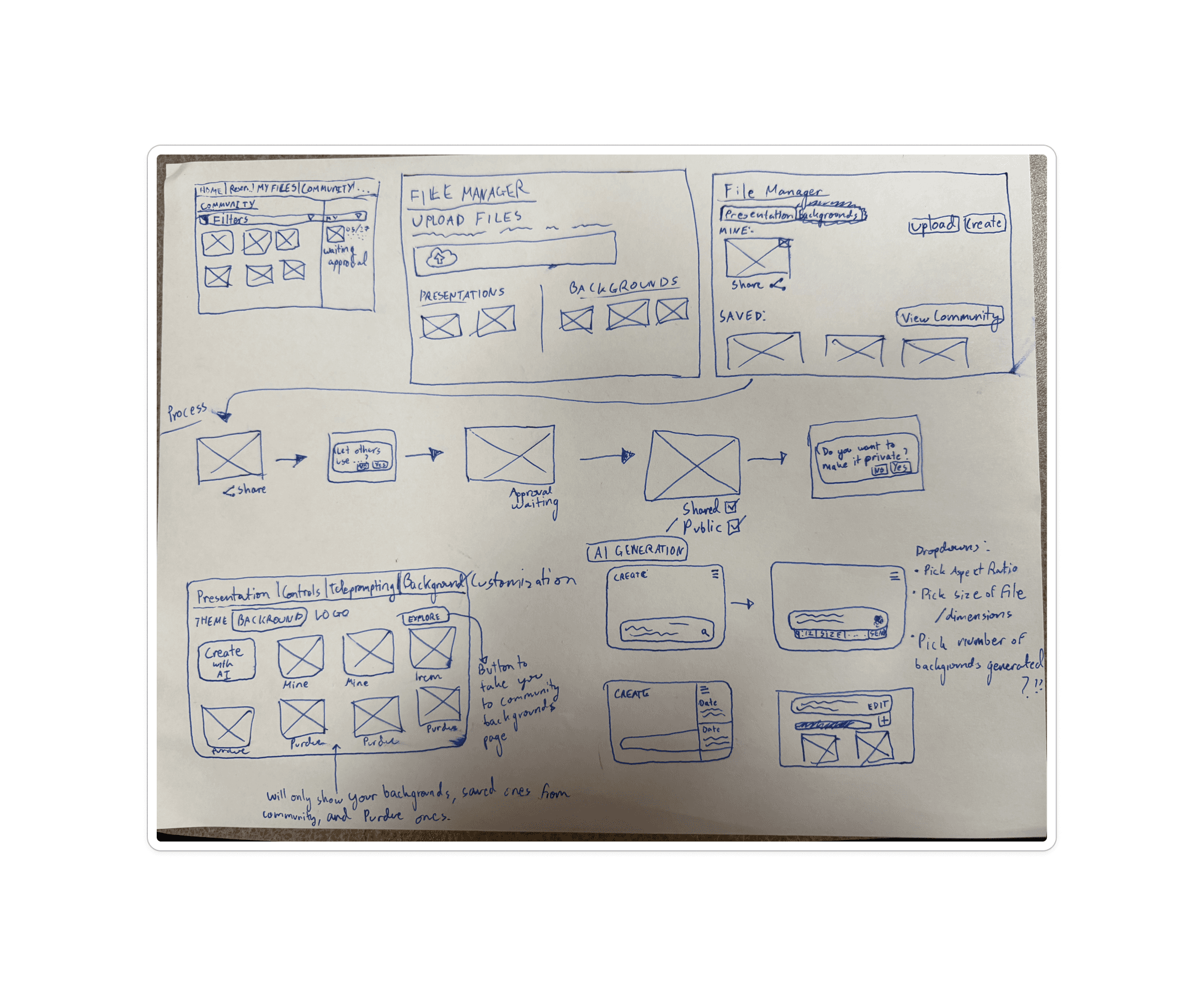
Below you can see the progress from my sketches (top left) to mapping out our information architecture (top right) to our mid-fis (bottom: exploring different versions of a Backgrounds page).


Results
Our final created experience spans a website, in-studio tablet, and an administrator interface all to allow users to create, explore, and share backgrounds to improve their video recording experiences within Video Express. Explore and click through the prototypes below!
I'm happy to announce that these changes are actively being implemented in the live Video Express website.
Website
The website supports the entire user journey, from reserving a studio and uploading presentation materials to creating AI-generated backgrounds, browsing community backgrounds, and accessing final video recordings. We introduced a new Backgrounds section to the navigation, along with three new pages: Personal Library, Create, and Community.
Administrator Flow
This is the flow for administrators to moderate and approve/deny submitted backgrounds. It includes the job queue (to improve the former 4 week approval process done through email), history, community edits, and multi-selecting. It also includes important content in the form of rejection reasons and feedback for users.
In-Studio Tablet
The tablet is used solely inside the studio to select video backgrounds. We added the Personal Library and Community features, giving users access to the same background library available on the website.